
SOLIDWORKS, mühendislik ve ürün tasarımında endüstri standardı. Ancak performansı donanımınıza doğrudan bağlı. Yanlış konfigürasyon seçimi, verimliliğinizi %50-70 oranında düşürebilir.
Bu rehberde, SOLIDWORKS iş yükünüze göre optimal BOXX sistemi seçimini öğreneceksiniz.
SOLIDWORKS Performansını Etkileyen Faktörler
1. CPU - Single-Thread Performance Öncelikli
SOLIDWORKS, single-threaded bir uygulama. Bu demek oluyor ki:
- Part modeling: 1 CPU core kullanır
- Assembly mates: 1 CPU core
- Sketch solving: 1 CPU core
- Feature regeneration: 1 CPU core
Multi-core sadece şuralarda kullanılır:
- Simulation (FEA, CFD)
- Rendering (PhotoView 360, Visualize)
- Drawing creation (multi-sheet)
- Large assembly open/save
Sonuç: Yüksek clock speed > Çok core sayısı
2. GPU - SOLIDWORKS Certified Gerekli
SOLIDWORKS, GPU'yu şunlar için kullanır:
- RealView Graphics - Realistic shading
- Ambient Occlusion - Shadow rendering
- Edge rendering - Sharp edges
- Large assembly - Smoothness
Önemli: Gaming GPU'lar (GeForce) SOLIDWORKS sertifikalı değil. Driver optimizasyonları eksik.
Önerilen: NVIDIA RTX Professional (Ada generation)
3. RAM - Assembly Boyutuna Bağlı
| Assembly Boyutu | Önerilen RAM |
|---|---|
| <500 part | 32GB |
| 500-2000 part | 64GB |
| 2000-5000 part | 128GB |
| 5000+ part | 256GB+ |
Not: SOLIDWORKS RAM'i şöyle kullanır:
- Model data: %40
- Graphics cache: %30
- OS ve diğer apps: %30
4. Depolama - NVMe SSD Zorunlu
SOLIDWORKS dosya I/O yoğun:
- Assembly load times
- Large file saves
- Backup operations
- Vault synchronization
HDD vs SSD:
- 5000-part assembly open: HDD 8 dakika, NVMe SSD 45 saniye
- Large drawing regen: HDD 5 dakika, SSD 40 saniye
Sonuç: NVMe SSD minimum gereksinim
SOLIDWORKS İş Yükü Profilleri
Profil 1: Part Modeling & Light Assembly
Tipik kullanıcı:
- Makine elemanları tasarımı
- Sheet metal parçalar
- Basit montajlar (<500 part)
- Drawings (2D detaylar)
Darboğaz:
- Part modeling hızı
- Feature regeneration
- Drawing creation
Önerilen BOXX: APEXX S4 (Core i9 varyant)
Profil 2: Medium Assembly & Rendering
Tipik kullanıcı:
- Ürün tasarımı
- Montaj tasarımı (500-2000 part)
- Rendering (PhotoView 360)
- Basic simulation
Darboğaz:
- Assembly load times
- Graphics performance
- Rendering speed
Önerilen BOXX: APEXX S4 (Overclocked + RTX 4000)
Profil 3: Large Assembly & Simulation
Tipik kullanıcı:
- Kompleks montaj (2000-5000 part)
- FEA simülasyon (Simulation Premium)
- CFD analizi (Flow Simulation)
- Advanced rendering (Visualize)
Darboğaz:
- Assembly handling
- Simulation solve time
- Multi-tasking (modeling + simulation)
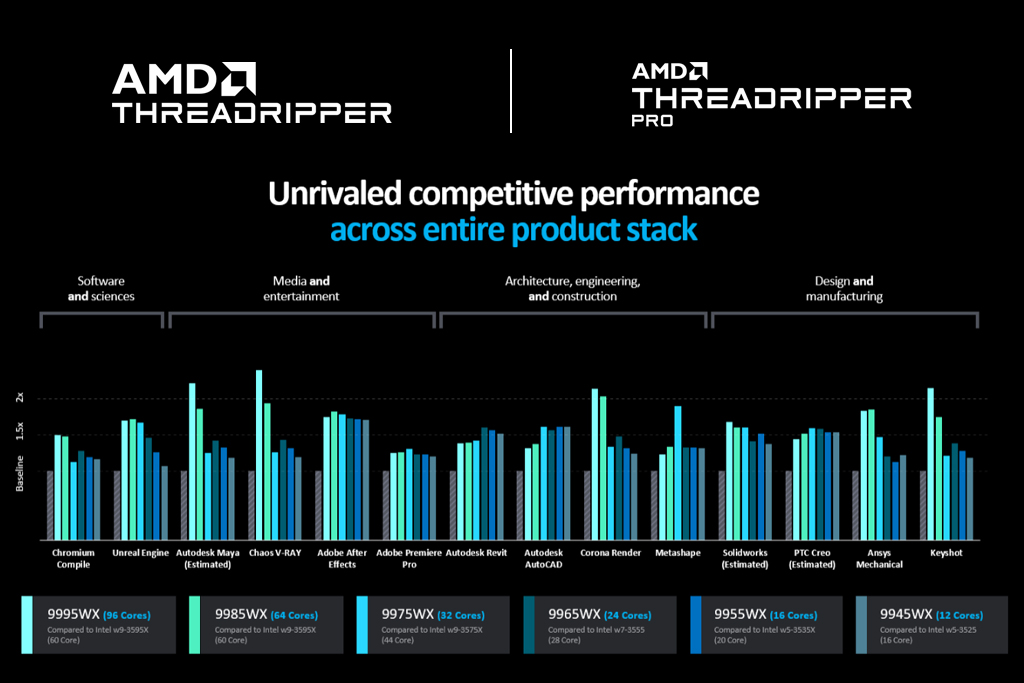
Önerilen BOXX: APEXX T4 (Threadripper varyant)
Profil 4: Enterprise & Top-Down Design
Tipik kullanıcı:
- Otomotiv/havacılık
- Çok büyük montajlar (5000+ part)
- PDM/PLM integration
- Multi-user collaboration
Darboğaz:
- Massive assembly performance
- Network file operations
- Multi-document workflows
Önerilen BOXX: APEXX T4 PRO (Threadripper PRO + ECC RAM)
SOLIDWORKS 2024 Benchmark Sonuçları
Part Modeling Performance
Test: Karmaşık part (200 feature), regen time
| Sistem | CPU | Regen Time |
|---|---|---|
| APEXX S4 | i9-14900KS (6.2 GHz) | 2.8s |
| APEXX S4 | i9-14900K (6.0 GHz) | 3.1s |
| APEXX T4 | Threadripper 7980X (5.1 GHz) | 3.9s |
| Budget PC | i5-13600K (5.1 GHz) | 4.2s |
Kazanan: i9-14900KS (en yüksek single-thread perf)
Large Assembly Performance
Test: 3500-part assembly, open time
| Sistem | RAM | GPU | Open Time |
|---|---|---|---|
| APEXX T4 PRO | 256GB | RTX 6000 Ada | 42s |
| APEXX S4 | 128GB | RTX 4000 Ada | 58s |
| APEXX S4 | 64GB | RTX 4000 Ada | 1m 18s |
| Budget PC | 32GB | RTX 4060 | 3m 45s |
Kazanan: APEXX T4 PRO (RAM + professional GPU)
Simulation Performance (FEA)
Test: Static analysis, 500K DOF, solve time
| Sistem | CPU Cores | Solve Time |
|---|---|---|
| APEXX T4 PRO | 96-core | 8m 15s |
| APEXX T4 | 64-core | 11m 30s |
| APEXX S4 | 24-core | 18m 45s |
| Budget PC | 14-core | 32m 10s |
Kazanan: APEXX T4 PRO (multi-core shines here)
Rendering Performance (Visualize)
Test: Complex scene, 4K, 256 passes
| Sistem | CPU | GPU | Render Time |
|---|---|---|---|
| APEXX T4 + RTX 6000 | 64-core | RTX 6000 Ada | 4m 35s |
| APEXX S4 + RTX 4000 | 24-core | RTX 4000 Ada | 8m 12s |
| Budget PC | 14-core | RTX 4060 | 28m 40s |
Kazanan: APEXX T4 + RTX 6000 (multi-core + powerful GPU)
SOLIDWORKS Sertifikalı GPU'lar
SOLIDWORKS, sadece belirli GPU'larla test ediyor ve sertifikalandırıyor.
NVIDIA RTX Professional (Önerilen)
| GPU | VRAM | Önerilen Kullanım |
|---|---|---|
| RTX 2000 Ada | 16GB | Part modeling, light assembly |
| RTX 4000 Ada | 20GB | Medium assembly, rendering |
| RTX 5000 Ada | 32GB | Large assembly, simulation |
| RTX 6000 Ada | 48GB | Enterprise, massive assembly |
Neden Professional GPU?
- ✅ SOLIDWORKS sertifikalı driver'lar
- ✅ Optimize edilmiş OpenGL performansı
- ✅ ECC memory (data integrity)
- ✅ 3 yıl garanti
Gaming GPU kullanırsanız:
- ❌ Driver sorunları (crash, artifacts)
- ❌ Yavaş RealView graphics
- ❌ Assembly performans düşüklüğü
- ❌ Garanti dışı
SOLIDWORKS için Önerilen BOXX Konfigürasyonları
BOXX APEXX S4 - Part Modeling Champion
İdeal kullanım:
- Part design
- Sheet metal
- Weldments
- Light assembly (<1000 part)
- 2D drawing
Konfigürasyon:
CPU: Intel Core i9-14900KS
- 24-core (8P + 16E)
- Boost: 6.2 GHz (highest single-thread)
- Overclocked + liquid cooled

GPU: NVIDIA RTX 4000 Ada 20GB
- SOLIDWORKS certified
- Excellent RealView performance

RAM: 64GB DDR5-6000
- Dual-channel
- Low latency

Storage:
- 1TB NVMe SSD (OS + SOLIDWORKS)
- 2TB NVMe SSD (Projects + Vault)

Display: 27" 4K IPS
- Color accurate
- Large workspace
Fiyat: Konfigürasyona göre - İletişim
Performans:
- Part modeling: ⭐⭐⭐⭐⭐
- Medium assembly: ⭐⭐⭐⭐
- Simulation: ⭐⭐⭐
- Rendering: ⭐⭐⭐⭐
BOXX APEXX T4 - Simulation Beast
İdeal kullanım:
- Large assembly (2000-5000 part)
- FEA simulation
- CFD analysis
- Rendering (Visualize)
Konfigürasyon:
CPU: AMD Threadripper 7980X
- 64-core, 128-thread
- Boost: 5.1 GHz
- Excellent multi-thread

GPU: NVIDIA RTX 5000 Ada 32GB
- Large assembly support
- Fast rendering

RAM: 128GB DDR5-5600
- Quad-channel
- High bandwidth

Storage:
- 2TB NVMe RAID (OS)
- 4TB NVMe RAID (Active projects)
- 8TB SATA SSD (Archive)
Fiyat: Konfigürasyona göre - İletişim
Performans:
- Part modeling: ⭐⭐⭐⭐
- Large assembly: ⭐⭐⭐⭐⭐
- Simulation: ⭐⭐⭐⭐⭐
- Rendering: ⭐⭐⭐⭐⭐
BOXX APEXX T4 PRO - Enterprise Solution
İdeal kullanım:
- Massive assembly (5000+ part)
- PDM/PLM integration
- Multi-user collaboration
- Mission-critical
Konfigürasyon:
CPU: AMD Threadripper PRO 7995WX
- 96-core, 192-thread
- 8-channel memory
- Enterprise features

GPU: NVIDIA RTX 6000 Ada 48GB
- Maximum VRAM
- Top performance

RAM: 256GB DDR5-5600 ECC
- Error correction
- Maximum reliability

Storage:
- 4TB NVMe RAID (redundant)
- 16TB NVMe (Projects)
- 10GbE network (PDM)
Fiyat: Konfigürasyona göre - İletişim
Performans:
- Part modeling: ⭐⭐⭐⭐
- Massive assembly: ⭐⭐⭐⭐⭐
- Simulation: ⭐⭐⭐⭐⭐
- Rendering: ⭐⭐⭐⭐⭐
- Reliability: ⭐⭐⭐⭐⭐
SOLIDWORKS Performans Optimizasyonları
BOXX sistemleri fabrikadan optimize edilmiş olarak gelir:
1. SOLIDWORKS Settings
System Options > Performance:
✅ Use Software OpenGL (disabled)
✅ Enhanced graphics performance (enabled)
✅ Level of Detail: Medium-High
✅ Large Assembly Mode: Auto enable
2. Graphics Card Settings
NVIDIA Control Panel > 3D Settings:
- Power mode: Prefer maximum performance
- Threaded optimization: On
- Vertical sync: Off (in SOLIDWORKS)
3. Windows Settings
Power Plan: High Performance
Virtual Memory: 1.5x RAM size
Disable: Indexing on project drives
4. Large Assembly Strategies
Lightweight Mode:
- Assembly > Open with Lightweight
- Faster open times
- Limited editing
SpeedPak:
- Create simplified representations
- Faster top-level assembly
Display States:
- Hide unnecessary components
- Graphics performance boost
Gerçek Müşteri Case Study'leri
Case Study 1: Otomotiv Tedarikçisi
Şirket: 15 tasarımcı, motor komponenti üretimi
Önceki sistem:
- Dell Precision (Xeon W, Quadro P2200)
- 32GB RAM
- Assembly open time: 5-8 dakika
BOXX APEXX T4:
- Threadripper 7970X (32-core)
- RTX 5000 Ada 32GB
- 128GB RAM
- Assembly open time: 35 saniye
Sonuçlar:
- %900 hız artışı
- Design iteration time: 2 gün → 6 saat
- Daha fazla tasarım alternatifi
- Müşteri memnuniyeti ↑
Case Study 2: Makine İmalat
Şirket: 8 mühendis, özel makine tasarımı
Challenge:
- Büyük montajlar (3000+ part)
- Günlük simulation analizi
- Tight deadlines
Çözüm: BOXX APEXX S4
- i9-14900K (overclocked 5.8 GHz all-core)
- RTX 4000 Ada 20GB
- 128GB RAM
Sonuçlar:
- Part regen: %40 daha hızlı
- Assembly handling: %300 iyileşme
- Simulation solve: %250 hızlanma
- ROI: 8 ay
SOLIDWORKS Lisans Seçimi
BOXX sistemleriyle hangi SOLIDWORKS lisansı?
SOLIDWORKS Standard
- Part/assembly modeling
- 2D drawing
- Basic rendering
Önerilen BOXX: APEXX S4 (i9)
SOLIDWORKS Professional
- PDM Standard
- PhotoView 360
- eDrawings Professional
Önerilen BOXX: APEXX S4 (i9 veya Threadripper)
SOLIDWORKS Premium
- Simulation
- Flow Simulation
- Motion analysis
- Routing
Önerilen BOXX: APEXX T4 (Threadripper)
SOLIDWORKS Enterprise
- PDM Professional
- Visualize Professional
- Enterprise features
Önerilen BOXX: APEXX T4 PRO
ROI Hesaplama
Senaryo: 5 Tasarımcı Ekibi
Mevcut durum:
- Budget workstations ($2,000 each)
- Her tasarımcı günde 2 saat bekliyor
- Assembly load: 30 dakika
- Simulation: 1 saat
- Export/rendering: 30 dakika
Yıllık maliyet:
- 5 tasarımcı × 2 saat/gün × 250 gün = 2,500 saat
- 2,500 saat × $50/saat = $125,000 kayıp
BOXX yatırımı:
- 5× APEXX S4 = ~$50,000
- Bekleme süresi: %70 azalma
Yıllık kazanç:
- 2,500 saat × 0.7 = 1,750 saat tasarruf
- 1,750 saat × $50/saat = $87,500
ROI: 7 ay
Sonuç: Doğru Sistemi Seçmek
SOLIDWORKS performansı için:
- CPU: Single-thread speed öncelikli (i9-14900KS ideal)
- GPU: SOLIDWORKS sertifikalı (RTX Professional)
- RAM: Assembly boyutuna göre (minimum 64GB)
- Storage: NVMe SSD zorunlu
BOXX avantajı:
- ✅ SOLIDWORKS için optimize edilmiş
- ✅ Sertifikalı GPU ve driver'lar
- ✅ Premium cooling (overclock için)
- ✅ 3 yıl garanti + support
- ✅ Kanıtlanmış ROI
Sisteminizi seçmek için bizimle görüşün: 📞 0850 303 26 99 📧 İletişim
SOLIDWORKS uzmanlarımız, iş yükünüze göre en uygun konfigürasyonu önerecektir.
Özel SOLIDWORKS Kullanıcıları Kampanyası: 31 Aralık 2024'e kadar BOXX sipariş eden SOLIDWORKS kullanıcılarına:
- SOLIDWORKS performans optimizasyon danışmanlığı
- RTX GPU driver optimization
- Ücretsiz 6 ay extended support
Kampanya detayları için iletişime geçin.